Installing Oracle 10G on a Unix (Solaris) system
We can install the Oracle database by following the steps below.
Hardware requirements
| RAM | Recommended SWAP Space |
| Up to 512 MB | Double the amount of RAM |
| 1024 MB – 2048 MB | 1.5x the amount of RAM |
| 2049 MB – 8192 MB | As much as the RAM |
| Over 8192 MB | 3/4 the amount of RAM |
400 MB /tmp space
1.5 GB – 3.5 GB for the Oracle application
| Version | Minimum Space (GB) |
| Enterprise Edition | 2.0 |
| Standard Edition | 1.5 |
| Custom (maximum) | 2.5 |
Controller
|
1 2 3 4 5 6 7 |
/usr/sbin/prtconf | grep "Memory size" /usr/sbin/swap -s df -k /tmp df -h |
Checking application suitability
|
1 |
isainfo -kv |
Check to see the missing packages
|
1 2 3 |
pkginfo -i SUNWarc SUNWbtool SUNWhea SUNWlibm SUNWlibms SUNWsprot SUNWtoo SUNWi1of SUNWi1cs SUNWi15cs SUNWxwfnt |
If there are missing packages
|
1 2 3 4 5 |
cd /cdrom/sol_10_910_x86/Solaris_10/Product pkgadd -d ./ SUNWi1cs pkgadd -d ./ SUNWi15cs |
Note: SUNWsprox is no longer necessary
Creating users and groups
|
1 2 3 4 5 6 7 |
groupadd oinstall groupadd dba groupadd oper useradd -m -d /export/home/oracle -s /usr/bin/bash -g oinstall -G dba oracle |
Entering kernel parameters in /etc/system
|
1 2 3 4 5 6 7 |
set semsys:seminfo_semmni=100 set semsys:seminfo_semmsl=256 set shmsys:shminfo_shmmax=4294967295 set shmsys:shminfo_shmmni=100 |
Kernel parameters
Using SHMMAX = 6GB as an example
|
1 2 3 4 5 6 7 |
set shmsys:shminfo_shmmax=6442450944 set semsys:seminfo_semmni=1024 set semsys:seminfo_semmsl=1024 set shmsys:shminfo_shmmni=100 |
Project
|
1 2 3 4 5 |
projadd -c "Oracle" 'user.oracle' projmod -s -K "project.max-shm-memory=(privileged,52GB,deny)" 'user.oracle' projmod -s -K 'process.max-open-file-descriptor=(basic,1024,deny)' 'user.oracle' |
Control
|
1 2 3 4 5 |
prctl -i project oracle prctl -n project.max-shm-memory -i project user.oracle prctl $$ |
Enter the following lines into /etc/inittab
|
1 2 3 4 5 6 7 8 9 |
####Oracle tm::sysinit:/usr/sbin/ndd -set /dev/tcp tcp_smallest_anon_port 9000 > /dev/console tm::sysinit:/usr/sbin/ndd -set /dev/tcp tcp_largest_anon_port 65500 > /dev/console tm::sysinit:/usr/sbin/ndd -set /dev/udp udp_smallest_anon_port 9000 > /dev/console tm::sysinit:/usr/sbin/ndd -set /dev/udp udp_largest_anon_port 65500 > /dev/console |
Necesary line for .profile
|
1 |
ulimit -n 1024 |
Required packages
|
1 2 3 4 5 6 7 8 9 10 11 12 13 14 15 16 17 18 19 20 21 22 23 24 25 26 27 28 29 |
============================================================= pkginfo -i SUNWarc + pkginfo -i SUNWbtool + pkginfo -i SUNWhea + pkginfo -i SUNWlibC + pkginfo -i SUNWlibm + pkginfo -i SUNWlibms + pkginfo -i SUNWsprot + pkginfo -i SUNWtoo + pkginfo -i SUNWi1of - (either this package isn't in the repository or didn't give an error message) pkginfo -i SUNWi1cs (ISO8859-1) - pkginfo -i SUNWi15cs (ISO8859-15) + pkginfo -i SUNWxwfnt - pkginfo -i SUNWcsl + ============================================================= |
.profile
|
1 2 3 4 5 6 7 8 9 10 11 12 13 14 15 16 17 18 19 20 21 22 23 24 25 26 27 28 29 30 31 |
ORACLE_HOSTNAME=sun11.gantek.local; export ORACLE_HOSTNAME ORACLE_UNQNAME=yts; export ORACLE_UNQNAME ORACLE_BASE=/u01/app/oracle; export ORACLE_BASE ORACLE_HOME=$ORACLE_BASE/product/11.2.0/dbhome_1; export ORACLE_HOME ORACLE_SID=yts; export ORACLE_SID BASE_PATH=/usr/sbin:$PATH; export BASE_PATH PATH=$ORACLE_HOME/bin:$BASE_PATH; export PATH #alias ‹ The list of aliases alias ll='ls -ltr' alias adb='tail -200f /u01/app/oracle/diag/rdbms/yts/yts/trace/alert_yts.log' alias sql='sqlplus / as sysdba' alias ohdb='cd /u01/app/oracle/product/11.2.0/dbhome_1' alias diag='cd /u01/app/oracle/diag' alias netdb='cd /u01/app/oracle/product/11.2.0/dbhome_1/network/admin' alias dbs='cd /u01/app/oracle/product/11.2.0/dbhome_1/dbs' alias scripts='cd /u01/app/oracle/admin/yts/scripts/' |
Making folders and granting rights
|
1 2 3 4 5 |
mkdir -p /u01/app/oracle chown -R oracle:oinstall /u01/app/oracle chmod -R 775 /u01/app/oracle |
Add the lines below to the Oracle .profile user file /export/home/oracle
|
1 2 3 4 5 6 7 8 9 10 11 12 13 14 15 |
# Oracle Settings TMP=/tmp; export TMP TMPDIR=$TMP; export TMPDIR # Select the appropriate ORACLE_BASE ORACLE_BASE=/oracle; export ORACLE_BASE ORACLE_HOME=$ORACLE_BASE/10g; export ORACLE_HOME ORACLE_SID=oratr; export ORACLE_SID PATH=$ORACLE_HOME/bin:$PATH; export PATH |
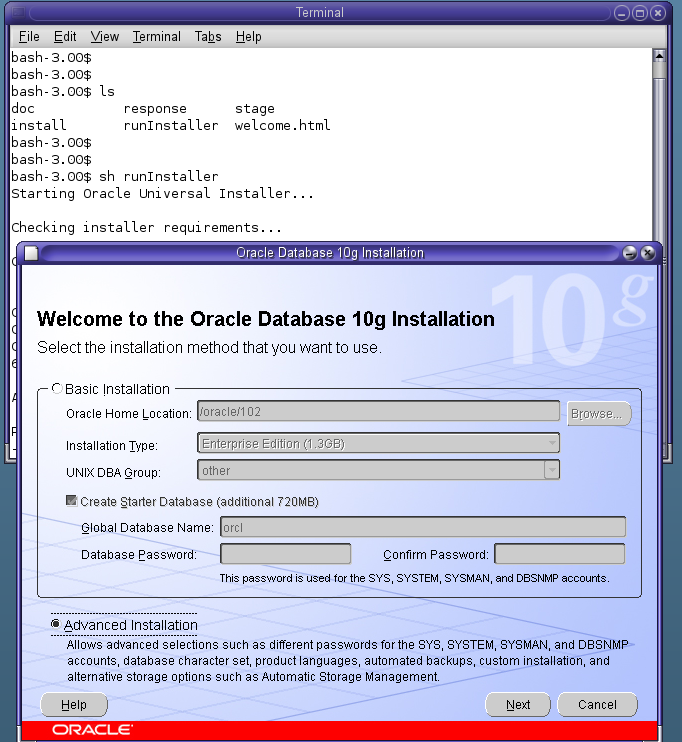
Enter the database directory and run the runInstaller script, after which during the installation procedure is the same as other Linux/Unix distros (such as installing 10G on Red Hat Enterprise Linux)
Common errors or issues
“snmpdx unable to get my ip address” errors are due to nsswitch.conf hosts–>dns.
Changing this option to files will most likely resolve this issue. The reason the dns setting causes this error is because the dns is unable to properly resolve its own name or maybe missing from the /etc/hosts file.
There needs to be an entry similar to “192.168.0.10 dbserver.istanbul.localdbserver” in the hosts file.
A “UX: useradd: ERROR: Inconsistent password files” error could be because of a “oracle::::project=oracle” entry in the user_attr file before creating an Oracle user.
Issues during the application installation procedure (at the linking stage), while invoking target irman ins_rdbms.mk, can be solved by increasing the size of /tmp.
|
1 2 3 |
zfs create -V 2gb rpool/extraswap swap -a /dev/zvol/dsk/rpool/extraswap |
To fix a sh runInstaller “ld.so libXM.so open failed no such file or directory” error.
|
1 |
pkg install pkg://solaris/library/motif |
ORA-27300: OS system dependent operation:fork failed with status: 11
ORA-27301: OS failure message: Resource temporarily unavailable
ORA-27302: failure occurred at: skgpspawn3
Troubleshooting ORA-27300 ORA-27301 ORA-27302 errors [ID 579365.1]
Ora-27300 OS system dependent operation:fork failed with status: 11 [ID 392006.1]
https://blogs.oracle.com/hasham/entry/solaris_10_increasing_number_of
|
1 2 3 4 5 6 7 8 9 10 11 12 13 14 15 16 17 18 19 |
# mdb -kw Loading modules: [ unix krtld genunix specfs dtrace uppc apix cpu.generic zfs sockfs ip hook neti sctp arp usba uhci fcp fctl qlc nca lofs md cpc random crypto fcip logindmux ptm ufs sppp nfs ipc ] maxuprc/D maxuprc: maxuprc: 27061 maxuprc/W 88B8 maxuprc: 0x69b5 = 0x88b8 maxuprc/D maxuprc: maxuprc: 35000 |
To make the changes in /etc/system permanent after reboot:
|
1 2 3 |
set maxuprc = 35000 set max_nprocs = 35000 |